One-click options to unlock or relock the bootloader for supported models.
Specialized modules to bypass Mi Cloud account verification and Lenovo or Motorola FRP locks.
The is a powerful, lightweight desktop utility designed for technicians and advanced users to troubleshoot, repair, and manage Android devices via the Fastboot protocol. Developed by TECH ANIL , this tool simplifies complex command-line operations into a user-friendly interface, making it essential for tasks like bypassing FRP locks and fixing boot loops. Key Features of v2.0
The latest version (v2.0) introduces several critical functionalities aimed at rescuing unresponsive or locked devices:
On your Android device, go to Settings > About Phone and tap Build Number seven times. Then, enable USB Debugging in Developer Options.
Choose the specific task (e.g., "Remove FRP") and follow the on-screen prompts to execute the command. Compatibility and Requirements
To use the tool effectively, your computer must have the necessary SDK Platform-Tools installed.
Using VerbAce-Pro
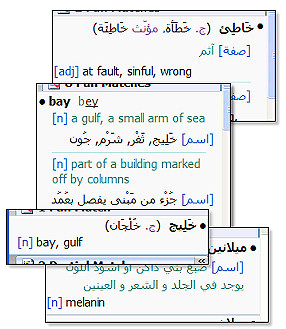
To use VerbAce-Pro just click on the word you want to translate, and the VerbAce-Pro results window will pop up with the trasnslation you need.
VerbAce-Pro captures and translates words and phrases from most Windows applications.
You can also pass the mouse over words and obtain quick translation via the Micro Window, or search for words by typing them in the term box.
Dictionary Features
|
Arabic broken plural and feminine forms | |
|
English usage indications | |
|
English broken plural forms | |
|
Entries sub-meanings (when applicable) | |
|
Many technical fields covered (Medicine, Anatomy, Law, Computing, Finance, and more) |
Advanced Morphological Engine
VerbAce-Pro morphological engine can analyze complex word formations and display the relevant dictionary entries.
The engine also detects and shows the form number of Arabic verbs.
One-click options to unlock or relock the bootloader for supported models.
Specialized modules to bypass Mi Cloud account verification and Lenovo or Motorola FRP locks. android fastboot reset tool v20 latest version
The is a powerful, lightweight desktop utility designed for technicians and advanced users to troubleshoot, repair, and manage Android devices via the Fastboot protocol. Developed by TECH ANIL , this tool simplifies complex command-line operations into a user-friendly interface, making it essential for tasks like bypassing FRP locks and fixing boot loops. Key Features of v2.0 One-click options to unlock or relock the bootloader
The latest version (v2.0) introduces several critical functionalities aimed at rescuing unresponsive or locked devices: Developed by TECH ANIL , this tool simplifies
On your Android device, go to Settings > About Phone and tap Build Number seven times. Then, enable USB Debugging in Developer Options.
Choose the specific task (e.g., "Remove FRP") and follow the on-screen prompts to execute the command. Compatibility and Requirements
To use the tool effectively, your computer must have the necessary SDK Platform-Tools installed.
Made with Mobirise web themes