|
ezDICOM DICOM viewer |
| Index
This software is designed to display most medical images: MRI, CT, X-ray, and ultrasound. All versions of ezDICOM can automatically detect the format of a medical image and display it on the screen. The ezDICOM project will appeal to several groups of people:
My DICOM page lists a large number of free DICOM viewers. So what are the benefits of ezDICOM? The main benefit is that the software is easy to use, mature (stable, few if any bugs) and can view a wide range of medical images including proprietary formats as well as images in the DICOM standard. For example, In addition, most free DICOM viewers only read a small subset of the DICOM images available, while ezDICOM can view a broad range of images. In addition to DICOM images, thesoftware will automatically recognize and display Analyze, GE (LX, Genesis), Interfile, Siemens (Magnetom, Somatom) and NEMA images. The greatest strength of ezDICOM is that it is free and open source. There are many variations of medical images 'in the wild' - many of these are poorly or incorrectly documented. By being free, ezDICOM has developed a wide user base, and this ensures the quality of the code. Thousands of people have used ezDICOM and sent in unusual and rare images, and the code is now mature and able to read virtually all the popular medical images. Therefore, the users are the most important strength of this software. It is important to acknowledge the many people who shared their images with the developers. The advantage of being open source is that programmers can modify and improve the code if they want. The project was started by Wolfgang Krug and has been expanded and maintained by Chris Rorden. Development was particularly aided by Earl F. Glynn's general programming tutorials and David Clunie's medical imaging FAQ. Special mention should also go to Jakob Scholbach (coauthored the lossless JPEG decoder), Armando Alaminos Bouza (Somatom formats), Yves Martel (various formats) and Sebastien Barre (useful suggestions). This software is covered by the BSD open source license. You can distribute both compiled projects and the source code. However, you should also distribute the license (the compiled standalone program makes this easy: the license is built into the 'about' window). The license also notes that the software is provided 'as is', use it at your own risk. This software attempts to reproduce medical images accurately. However, it is not designed for clinical use: computer monitors can vary tremendously in image quality. All grayscale images are rendered in 256-levels of gray (this is true of all of the viewers which I know of). |
| ezDICOM
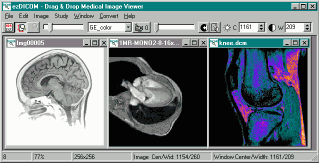
for users Introduction. The standalone ezDICOM for windows program is a basic but useful tool for viewing medical images. This software will run on computers with Windows 95 or later and requires less than 300 Kb of disk space. To view an image, you simply drag and drop the image onto the program (or you can choose 'Open...' from the 'File' menu). Despite the ease of use, ezDICOM has a number of powerful features. For example, you can set the brightness and contrast of an image with great precision.You can also animate images that have multiple slices (e.g. see a heart beating over time or see different depths into the brain). Installation. To download the ezDICOM standalone application [version 1, release 24 ], shift+click here. The program is distributed as a compressed zip file - simply extract the files and double click on ezDICOM.exe. Delphi source code is also included. |
 Hottalicia Top !exclusive!For the Gym: Pair your top with high-waisted compression leggings and sleek trainers. Look for racerback designs that allow for a full range of motion in the shoulders during lifts or yoga sessions. Hottalicia tops have taken the fashion world by storm, blending bold aesthetics with versatile functionality. Whether you are hitting the gym, heading to a music festival, or just looking to elevate your street style, these pieces offer a unique combination of comfort and edge. This guide explores everything you need to know about styling, sizing, and maintaining your collection. The Rise of Modern Athleisure Finding the perfect fit is crucial for both comfort and confidence. Because these tops are designed to be form-fitting, many users find that sizing up provides a more comfortable "everyday" feel, while staying true to size offers the maximum "sculpting" effect. Always check the specific size chart for the blend of fabric, as higher spandex content will offer more compression. Care and Longevity hottalicia top The fashion industry has seen a massive shift toward "performance chic." Clothes are no longer just about looking good; they have to move with you. The hottalicia top embodies this movement by utilizing high-tech fabrics that offer four-way stretch and moisture-wicking properties. These aren't just basic tank tops; they are engineered garments designed to highlight the silhouette while providing necessary support for an active lifestyle. Key Features and Fabric Technology To keep your tops looking brand new, avoid high heat. Machine wash them in cold water on a gentle cycle and always hang them to dry. Excessive heat from a dryer can break down the elastic fibers over time, leading to a loss of shape and vibrancy in the colors. Using a mesh laundry bag can also prevent the straps from getting tangled or stretched during the wash. For the Gym: Pair your top with high-waisted What sets a high-quality top apart is the attention to detail in the construction. Most designs feature reinforced stitching to prevent chafing during high-intensity movement. The fabric blends often include spandex or elastane for shape retention, ensuring the top doesn't bag out after a few washes. Additionally, many styles incorporate breathable mesh panels or strategic cut-outs that serve both a functional cooling purpose and a visual stylistic choice. How to Style Your Top for Any Occasion For a Night Out: Transition your look by layering a hottalicia crop top under a structured blazer. Combine this with oversized faux-leather trousers and pointed-toe heels for a high-fashion contrast between sporty and sophisticated. Whether you are hitting the gym, heading to The hottalicia top is more than just a trend; it is a staple for the modern wardrobe. By focusing on quality materials and versatile designs, it bridges the gap between functional sportswear and contemporary fashion. Whether you prefer neon bolds or classic neutrals, there is a silhouette designed to make you feel powerful and stylish in any setting. |
| DCM2JPG console
application DCM2JPG is a simple command-line Windows program. If you drop a file on the program it will create a JPEG version of the file (alternatively, if you name the program 'dcm2png.exe' or 'dcm2bmp.exe' it will create PNG or BMP format images). You can also call the program from the command line, to do special functions like change the image brightness or contrast (most grayscale DICOM images have much higher precision than can be saved to standard bitmap formats). Another nice feature is the ability to create nice zoomed versions of DICOM images - e.g. save a 128x128 pixel image as a 192x192 pixel bitmap (scaling is done using a bilinear-interpolation method to reduce any jaggy edges). Both a compiled program and the (ezDICOM-based) source code can be downloaded by shift+clicking here. Here is a short overview of the commands: OPTIONS
EXAMPLE:
TRICKS:
|
| ezDICOM for
programmers The basic concept is that code for ezDICOM can be included in more complicated projects. A good example is Chris Rorden's MRIcro freeware. MRIcro includes a lot of powerful features that are useful for scientists studying the brain. The casual user will find MRIcro much more difficult to use than the basic ezDICOM, but specialist will appreciate MRIcro's additional features. There are actually three versions of ezDICOM available for programmers, depending on the computer language you use. In all cases, the source code is provided, so you can either use the software as a modular unit without needing to learn about any of the details of medical imaging, or you can modify how these components work.
|
 |